Fact #3: Markdown in documenting comments
TL;DR: Where Java uses verbose HTML markup, in Kotlin you can use Markdown.
Kotlin uses KDoc to document the code. It’s not an extension of Javadoc, but not by accident it’s similar to it. However, Kotlin designers decided to go another way for certain features.
Let’s take a look at an example Javadoc:
/**
 * Here I'm going to list some <b>important things</b> to know when calling this function:
 * <ul>
 * <li>first item</li>
 * <li>second item - look at <a href="example.com">this link</a></li>
 * <li>third item</li>
 * </ul>
 *
 * Paragraph 2
 * <br>
 * Paragraph 3
 */
public void someImportantFunction() {
HTML looks a big clunky these days, right? It certainly adds some noise - extra effort when both writing and reading it. It wasn’t really designed to be readable as code, in contrast to Markdown.
Converting the above to Kotlin gives us:
/**
 * Here I'm going to list some **important things** to know when calling this function:
 *
 *  * first item
 *  * second item - look at [this link](example.com)
 *  * third item
 *
 * Paragraph 2
 *
 * Paragraph 3
 */
fun someImportantFunction() {
Looks simpler, right?
You may say that some modern IDEs actually render the documenting comments. It’s true:
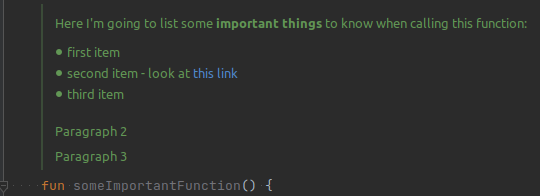
However, not all tools do it. For example, during code review, or simply browsing on GitHub or BitBucket. Editing the comment in a WYSIWYG manner is also in theory possible, but since most of us already got used to Markdown, we can use it as well and appreciate KDoc for this improvement.